
Introduction
A modern laptop can be powerful enough for work, study and entertainment, yet its limited selection of physical ports can quickly become frustrating. Add two external monitors, several USB accessories and laptop charging to the equation, and a simple USB-C connection can become much more valuable.
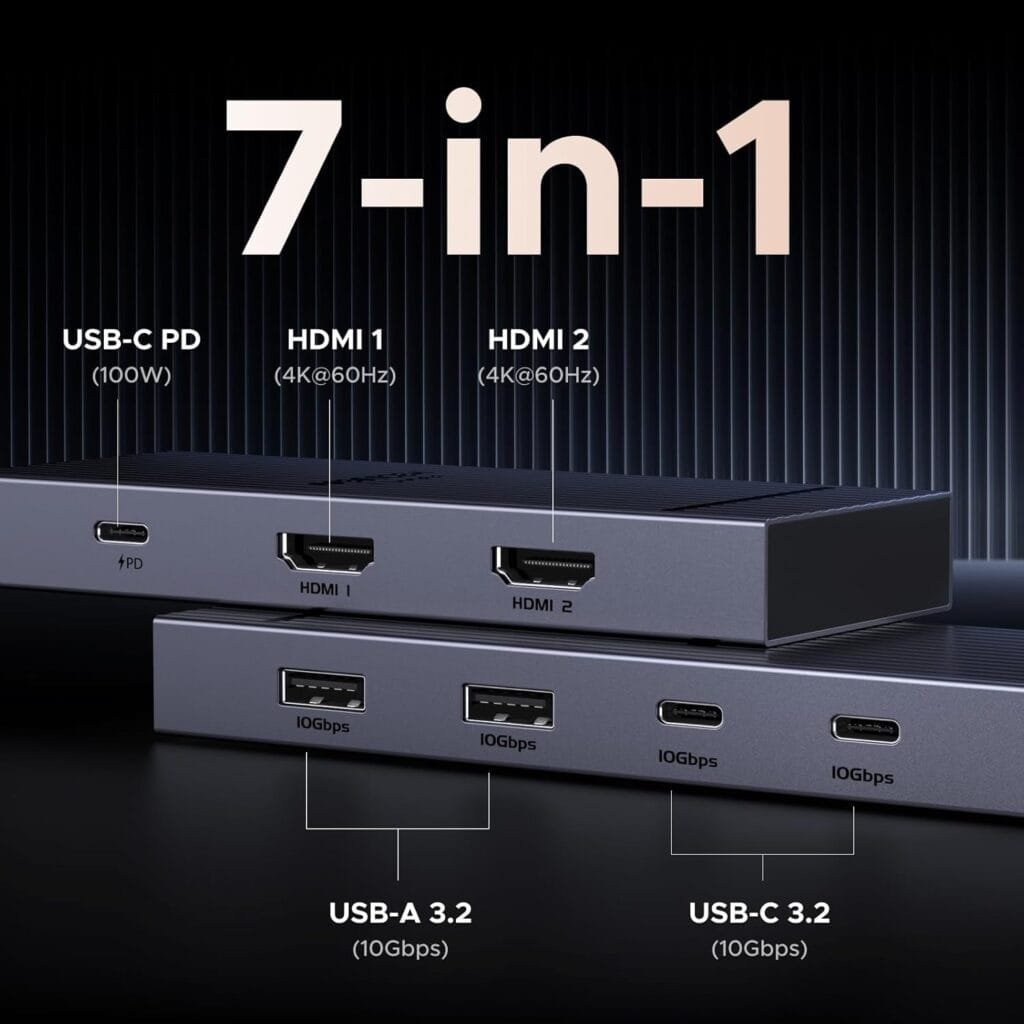
The UGREEN USB C Docking Station Dual Monitor is designed to address that problem with a 7-in-1 configuration that combines dual HDMI display outputs, four 10Gbps USB data ports and 100W Power Delivery in an aluminium dock. It is part of UGREEN’s Revodok Pro range and is designed for laptops and other compatible USB-C devices.
More importantly, this model has a particularly useful combination of features for anyone building a dual-monitor workspace without immediately moving to a larger or more elaborate docking solution.
Table of Contents
Quick Summary UGREEN USB C Docking Station Dual Monitor
The UGREEN Revodok Pro docking station brings seven connections together in one USB-C dock:
- 2 HDMI ports
- 2 USB-A ports supporting 10Gbps data transfer
- 2 USB-C ports supporting 10Gbps data transfer
- 1 USB-C PD charging port supporting up to 100W
- Dual 4K@60Hz HDMI display support
- Aluminium construction
- Compatibility with a range of USB-C laptops and devices
This combination makes it our best budget pick for users who prioritise dual-monitor connectivity and fast USB data connections without needing a long list of additional ports.
The key point is that “budget pick” here refers to the balance of the features provided by this particular dock. The supplied product information does not establish that it is the cheapest dock available, so this recommendation is based on its feature mix rather than an unverified price comparison.
Check the latest price on Amazon
What Is the UGREEN USB C Docking Station Dual Monitor?
The UGREEN USB C Docking Station Dual Monitor is a 7-in-1 USB-C docking station designed to expand the connectivity of compatible laptops and devices.
Its main attraction is the combination of two HDMI ports with four 10Gbps USB data ports. That gives users a straightforward way to connect two HDMI displays while also attaching USB peripherals and accessories.
The dock also includes a USB-C Power Delivery port rated for up to 100W. This gives the docking station a useful role in a desktop-style setup where the laptop needs charging while connected to external displays and USB accessories.
The product is described as an aluminium dock, giving it a more substantial physical design than a basic collection of loose adapters.
Instead of connecting several individual dongles to a laptop, users can connect compatible equipment through one central docking station.
That is the basic appeal of the UGREEN USB C Docking Station Dual Monitor: it concentrates important connections into a single 7-in-1 solution.
Why UGREEN USB C Docking Station Dual Monitor Is Our Best Budget Pick
The best budget product is not always the one with the lowest possible price. A better way to look at a budget pick is to consider how much useful functionality you receive without adding unnecessary complexity.
That is where the UGREEN Revodok Pro stands out.
The feature combination is focused. You get dual HDMI outputs for monitors, four 10Gbps USB data connections and a 100W PD port. For someone building a productivity-focused workstation, those are meaningful connections.
The dock does not attempt to include every possible port. Instead, it concentrates on display connectivity, USB data and charging.
That makes it particularly interesting for users whose priorities are:
- Connecting two HDMI monitors
- Running external USB accessories
- Using both USB-A and USB-C data devices
- Charging a compatible laptop through USB-C PD
- Keeping the connection setup relatively simple
- Having a single 7-in-1 dock instead of several separate adapters
This focused approach is why the UGREEN Revodok Pro is a strong budget-oriented dual-monitor docking station pick.
Key Features
The UGREEN Revodok Pro USB C docking station has a straightforward feature set that is easy to understand.
Dual HDMI Outputs
The dock includes two HDMI ports. Both are specified for 4K@60Hz, making dual high-resolution HDMI connectivity one of its central features.
Four 10Gbps USB Data Ports
There are four USB data ports in total:
- Two USB-A ports
- Two USB-C ports
All four are specified for 10Gbps data transfer.
That mix is useful because modern setups can contain both traditional USB-A accessories and newer USB-C peripherals.
100W USB-C PD
The dedicated USB-C Power Delivery port supports up to 100W.
The product information also specifies that the charging cable and power adapter are not included. The PD port is for charging rather than data transfer or video output.
Seven Connections in One Dock
The seven-in-one configuration gives the dock a clear purpose: simplify a laptop setup by bringing multiple commonly needed connections into one device.
Aluminium Construction
The dock uses an aluminium design, giving it a practical fit for a desktop workspace where appearance and compact connectivity both matter.
Dual 4K@60Hz Monitor Support
One of the biggest reasons to consider this dual 4K@60Hz docking station is its two HDMI outputs.
Both HDMI ports are specified to support 4K@60Hz, allowing the dock to serve a dual-monitor configuration where the connected system and displays are compatible with the required HDMI protocol.
For productivity, two displays can be particularly useful. A user can dedicate one display to a primary application while keeping reference material, communications or another task on the second screen.
However, it is important not to interpret the dock’s specification as a guarantee that every laptop will automatically provide every possible dual-display configuration.
The product information specifically notes that video output must be compatible with the HDMI protocol. Compatibility between the laptop, USB-C connection, operating system and display setup remains important.
Windows and Mac Considerations
The supplied product information makes an important distinction between operating systems.
Windows systems can utilise an extended dual-screen display configuration.
Mac devices are limited to mirror mode according to the product listing.
That distinction matters if your main reason for buying a docking station is to create an extended desktop across two external monitors.
Before buying, Mac users should therefore pay particular attention to the display behaviour specified for their device.
Four 10Gbps USB Data Ports
A common weakness of basic laptop adapters is having too few USB connections.
The UGREEN USB C Docking Station Dual Monitor takes a different approach by providing four 10Gbps USB data ports.
Two are USB-A and two are USB-C.
That gives the dock a useful balance between older and newer peripherals. USB-A remains common for keyboards, mice and other accessories, while USB-C is increasingly used for newer devices and accessories.
10Gbps USB C Docking Station Connectivity
The four 10Gbps connections make this a 10Gbps USB C docking station designed around high-speed USB data connectivity.
The product information identifies the USB-A and USB-C connections as data ports. It also notes that these USB A and C data ports do not provide charging capabilities or audio transfer.
That distinction is important.
The dedicated PD port is the charging connection, while the four USB ports are intended for data connections.
This separation makes the port layout easier to understand when planning a workstation.
100W Power Delivery
The dock includes a USB-C PD port rated at 100W.
For users who want to keep a laptop charged while it is connected to external monitors and USB accessories, having a dedicated PD input is an important part of the docking experience.
The product listing specifies 100W Power Delivery, but it also states that the charging cable and power adapter are not included.
That means buyers should account for the required charging equipment when planning their setup.
100W PD Docking Station for Laptop Workspaces
The 100W PD docking station configuration makes sense for a desk where the laptop is connected to the dock for longer periods.
Instead of treating the dock solely as a USB hub, the PD connection gives it a role in the broader workstation.
It is worth remembering that the PD port is specifically for charging. According to the supplied product details, it does not provide data transfer or video output.
7-in-1 Connectivity
The seven-in-one design is one of the strongest reasons to consider this dock.
The seven connections consist of:
| Connection | Quantity | Stated Function |
|---|---|---|
| HDMI | 2 | Dual 4K@60Hz display output |
| USB-A | 2 | 10Gbps data |
| USB-C | 2 | 10Gbps data |
| USB-C PD | 1 | Up to 100W charging |
This is a practical selection for a dual-monitor productivity setup.
Instead of purchasing separate HDMI and USB adapters, the dock brings the main connections together.
The absence of unrelated connections can also be viewed as a benefit if you already have a setup that does not require a long list of additional interfaces.
Aluminium Design
The UGREEN Revodok Pro uses an aluminium construction.
For a desktop accessory, this is a sensible design choice because the dock is intended to sit alongside a laptop, monitors and other equipment.
The product information identifies the enclosure material as aluminium.
The design also fits the general role of a docking station: it is intended to act as a central connection point rather than something that has to be repeatedly connected and disconnected as a collection of individual adapters.
Compatibility Considerations
Compatibility should be one of the first things you check before purchasing any USB-C docking station.
The UGREEN product information lists compatibility with a range of devices and platforms, including HP laptops, ThinkPad systems, Dell devices and other compatible USB-C products.
The product title also identifies support for HP, ThinkPad, Dell and more.
The supplied compatibility information includes devices such as MacBook Air, MacBook Pro, Dell XPS, ThinkPad, iPad Pro and other compatible systems.
However, the exact capabilities of a dock can depend on the USB-C implementation of the host device.
This is particularly important for dual-monitor use.
Check Your Laptop Before Buying
Before choosing the UGREEN USB C Docking Station Dual Monitor, check:
- Whether your laptop has a compatible USB-C port.
- Whether that USB-C connection supports the required display functionality.
- Whether your operating system supports the display configuration you want.
- Whether your monitors use compatible HDMI connections.
- Whether you already have the required charging cable and power adapter.
Doing these checks can prevent buying a dock with features that your particular laptop cannot fully utilise.
Who Should Buy The UGREEN USB C Docking Station Dual Monitor?
The UGREEN Revodok Pro is particularly well suited to users who want a straightforward dual-monitor workstation.
Remote Workers
If your laptop is the centre of your work setup, two external displays can make it easier to organise multiple applications and information sources.
The combination of dual HDMI and four USB data ports gives this dock a practical role in a home office.
Students
Students who use a laptop with multiple USB accessories and external displays may appreciate having those connections consolidated through one dock.
The 7-in-1 layout avoids the need to rely on several individual adapters for the functions covered by this product.
Office Professionals
For an office workstation built around a compatible laptop, the UGREEN Revodok Pro provides the key connections needed for dual HDMI monitors and USB peripherals.
Users With USB-C Accessories
The two USB-C 10Gbps data ports are useful for setups that include newer USB-C peripherals alongside traditional USB-A accessories.
Dual-Monitor Users
This is arguably the clearest target audience.
If your priority is two HDMI monitors, fast USB data connectivity and laptop charging through one USB-C docking station, the product’s specifications align closely with that requirement.
Who May Want Something Different?
Despite its useful feature set, the UGREEN Revodok Pro is not necessarily the right choice for every user.
You may want to consider another type of dock if your setup requires connections that are not included in this seven-port configuration.
For example, the supplied product details do not list Ethernet, SD card, microSD card, DisplayPort or an analogue audio connection.
If any of those are essential to your workflow, you should check whether your chosen docking station provides them before buying.
Mac users should also take special note of the stated display limitation. The product information says Windows systems can use an extended dual-screen display, while Mac devices are limited to mirror mode.
Buying Considerations
Choosing a docking station should start with your actual setup rather than the number of ports printed on the box.
1. Start With Your Displays
If you have two HDMI monitors, the two HDMI outputs are directly relevant.
The dock’s dual 4K@60Hz specification makes it particularly attractive for users who want a high-resolution dual-display configuration on compatible systems.
2. Count Your USB Devices
Four 10Gbps USB data ports provide a useful combination of USB-A and USB-C.
Think about the devices you regularly connect. If your accessories are split between USB-A and USB-C, the balanced port selection can be especially convenient.
3. Consider Charging Requirements
The 100W PD port is an important feature, but remember that the charging cable and power adapter are not included according to the product information.
Make sure your charging equipment is suitable for the intended setup.
4. Check Your Operating System
Operating-system compatibility can affect how you use the display outputs.
Windows users can use an extended dual-screen configuration according to the product information, while Mac devices are limited to mirror mode.
5. Think About Future Needs
A docking station can remain part of your workspace for a long time, so consider whether your current port requirements are likely to change.
If you expect to need Ethernet, card readers or additional display interfaces, this seven-port configuration may not cover everything.
Pros and Cons
Pros
- Dual HDMI outputs
- Dual 4K@60Hz display specification
- Four 10Gbps USB data ports
- Two USB-A and two USB-C data connections
- 100W USB-C Power Delivery
- Seven-in-one configuration
- Aluminium construction
- Designed for compatible HP, ThinkPad, Dell and other USB-C devices
- Strong fit for dual-monitor productivity setups
Cons
- Charging cable and power adapter are not included
- USB-A and USB-C data ports do not provide charging
- USB data ports do not support audio transfer according to the product information
- The PD port does not provide data transfer or video output
- Mac devices are limited to mirror mode according to the supplied product information
- The seven-port design does not include every connection some users may require
Value for Money
Value is about more than the number of ports.
The UGREEN Revodok Pro puts particular emphasis on three areas: displays, USB data and charging.
Its dual HDMI ports support 4K@60Hz, while four USB-A and USB-C data ports support 10Gbps transfers. The dedicated PD port adds up to 100W charging capability.
That combination gives the dock a clear value proposition for users who need those specific features.
Rather than paying for a collection of ports that may never be used, a buyer can choose this dock because its main features align with a dual-monitor workstation.
That is also why it works well as our best budget pick. The recommendation is based on its practical feature balance, not on an unverified claim that it has the lowest price in the market.
Why Choose the UGREEN Revodok Pro?
There are plenty of reasons someone might need a USB-C hub, but a dual-monitor workstation demands more specific connectivity.
The UGREEN Revodok Pro brings together:
- Two HDMI display outputs
- Four 10Gbps USB data ports
- Two USB-A data ports
- Two USB-C data ports
- A 100W USB-C PD port
- Aluminium construction
- A seven-in-one design
That is a focused combination.
For users whose laptop setup revolves around two HDMI monitors and several USB accessories, the dock provides the connections that matter most without requiring a much larger collection of separate adapters.
FAQs
Is the UGREEN USB C Docking Station Dual Monitor suitable for two monitors?
The dock has two HDMI ports, with both specified for 4K@60Hz. The connected laptop and displays must support the required HDMI and USB-C display functionality.
Does the UGREEN Revodok Pro support 4K@60Hz?
Yes. The product information specifies two HDMI ports supporting 4K@60Hz.
How many USB ports does the dock have?
It has four USB data ports in total: two USB-A ports and two USB-C ports. They are specified for 10Gbps data transfer.
Does the dock support 100W charging?
Yes. The dedicated USB-C Power Delivery port supports up to 100W. The product information states that the charging cable and power adapter are not included.
Is this a good choice for a dual-monitor workstation?
It can be a strong choice for a compatible laptop-based workstation where dual HDMI displays, four 10Gbps USB data ports and USB-C PD charging are the main requirements.
Does it work the same way on Windows and Mac?
The supplied product information states that Windows systems can utilise an extended dual-screen display, while Mac devices are limited to mirror mode.
Final Verdict
The UGREEN USB C Docking Station Dual Monitor is a focused 7-in-1 solution for users who want to turn a compatible USB-C laptop into a more capable dual-monitor workstation.
Its strongest advantage is the combination of two HDMI outputs supporting 4K@60Hz, four 10Gbps USB data ports and a dedicated 100W USB-C PD charging port.
The port selection is especially appealing for users who have both USB-A and USB-C accessories. The aluminium construction also gives the dock a suitable design for a permanent or semi-permanent desktop workspace.
It is not an all-purpose docking station for every conceivable connection. The seven-port design deliberately focuses on HDMI display output, USB data and charging. Buyers who need Ethernet, memory-card readers or other specialised connections should consider their requirements before choosing it.
For the right user, however, that focused design is precisely what makes it compelling.
If your main priorities are dual 4K@60Hz HDMI monitors, four 10Gbps USB data connections and up to 100W USB-C PD charging, the UGREEN Revodok Pro deserves serious consideration.
That combination is why we recommend it as our best budget pick for a dual-monitor USB-C docking setup, based on the feature balance described by the product information.
View the UGREEN USB C Docking Station Dual Monitor on Amazon
For more curated product recommendations, explore the best tech product picks.