
If you’ve ever paid for a website and felt unsure what you actually received at the end, you’re not alone. Most “handover” problems are not design problems. They’re access, ownership, performance, and missing basics that only show up later when you try to update the site or run marketing.
This WordPress website build handover checklist explains what you should receive from any developer or agency, and uses our real OnlineDigiServ build as an example. Our site was built by VVRapid (https://vvrapid.com/website-design-development/), and the handover quality is a good benchmark of what “proper” looks like.
Disclosure: VVRapid built OnlineDigiServ. This resource is based on our real project and the handover checks we ran. Read our approach here: https://onlinedigiserv.com/how-we-test/ and our disclosure here: https://onlinedigiserv.com/disclosure/
Table of Contents
Use this WordPress website build handover checklist before you make your final payment or sign off the project.
The three handover failures that cost you money later
Most website buyers get caught by one of these:
1) You don’t own the important accounts
If your developer controls your hosting, domain, analytics, or admin access, you’re vulnerable. You can’t change providers cleanly, you can’t troubleshoot, and you may end up paying extra for simple tasks.
2) Nobody proves performance
“Fast” is not a feeling. It’s measurable. If you don’t get proof at handover, speed often becomes a future problem you pay to fix later.
3) There’s no checklist, just a “looks good”
A proper handover includes a clear list of what was delivered, what was excluded, and what you should do next.
This checklist helps you avoid all three.
WordPress website build handover checklist
We built this WordPress website build handover checklist from real projects and the most common handover mistakes we see.
Use this list for any WordPress build, whether you’re using a freelancer, agency, or in-house developer.
A) Ownership and access (non-negotiable)
You should have:
- WordPress Administrator login (not Editor)
- Hosting login (or your own hosting account where the developer is added as a user)
- Domain registrar login (or proof the domain is in your name)
- DNS access (so email and records can be managed)
- A list of all key accounts used (theme, plugins, email provider, CDN if any)
Why this matters: if you lose access, you’re locked in.
B) Security and backups (baseline)
You should receive:
- Backup method explained (what, where, how often, how to restore)
- Security basics confirmed (updates, admin protections, minimal plugin bloat)
- A plan for ongoing updates (who does it, how often)
If you want the site to last, this is essential.
C) Performance and optimisation (proof required)
You should receive:
- A caching and optimisation approach explained (for example LiteSpeed)
- Image optimisation method (what tool, what format, what size)
- Mobile performance proof (see below)
D) SEO and tracking basics
You should receive:
- Confirmation of Search Console and Analytics setup (or clear instructions if you will do it)
- Basic indexing settings (no accidental noindex)
- A sitemap available and submitted (or ready to submit)
E) Content and editing handover
You should receive:
- A quick walkthrough of how to edit pages and posts
- Global styles explained (fonts, colours, buttons)
- Which blocks or builder tools were used
- Anything custom documented (shortcodes, templates, CSS snippets)
F) Post-launch support and boundaries
You should know:
- What is included after launch (support window, bug fixes)
- What is excluded (new features, redesigns, content writing)
- How change requests are handled (timeframes and costs)
Performance proof: what to ask for (not promises)
A proper WordPress website build handover checklist always includes measurable proof, not just claims.
Ask your developer for screenshots from:
- Google PageSpeed Insights: https://developers.google.com/speed/pagespeed/insights/
- Ahrefs Site Audit: https://ahrefs.com/site-audit
- Your caching stack documentation (for example LiteSpeed): https://www.litespeedtech.com/products/cache-plugins/wordpress-acceleration
This isn’t about chasing perfect scores. It’s about proving the baseline is healthy before you invest in SEO or ads.
Our example handover from VVRapid (what we received)
OnlineDigiServ was built by VVRapid. Here’s what made the handover feel “proper” from a buyer’s point of view:
1) Measurable performance at handover
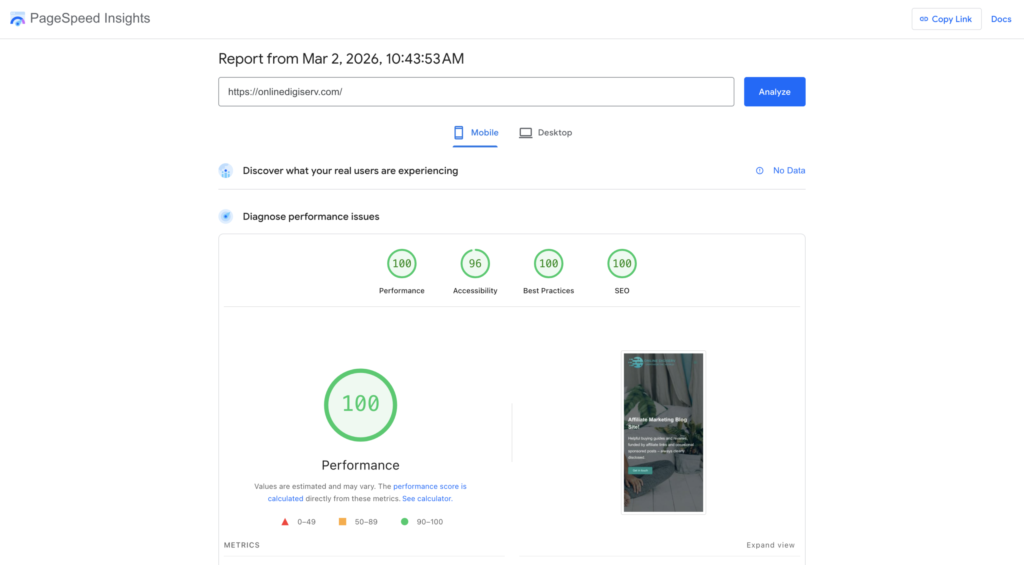
Our PageSpeed Insights report (Mobile) showed:
- Performance 100
- Accessibility 96
- Best Practices 100
- SEO 100
Report date: 2 March 2026
2) A clean technical baseline
We also captured:
- Ahrefs Site Audit score: 100
Insert image: Ahrefs screenshot
Alt text: WordPress website build handover checklist proof: Ahrefs Site Audit score of 100 for OnlineDigiServ at handover.
3) LiteSpeed performance evidence
LiteSpeed results were captured as screenshots and included with handover documentation.
Insert image: LiteSpeed screenshot(s)
Alt text: WordPress website build handover checklist proof: LiteSpeed performance results for OnlineDigiServ showing strong speed and optimisation scores at handover.
4) A structure built for growth
Because OnlineDigiServ is a content site, the navigation and pillar structure were set up so the site can expand without needing a rebuild later. That matters if you plan to publish regularly.
If you want to see what that structure looks like in practice, browse:
- Resources: https://onlinedigiserv.com/resources/
- Reviews: https://onlinedigiserv.com/reviews/
Red flags to watch for at handover
If any of these happen, pause and ask questions:
- You are not given admin access
- The developer refuses to provide account ownership details
- You are told “it’s fast” but no proof is provided
- You receive a site with 30+ plugins and no explanation
- There is no backup and restore plan
- There is no plan for updates and security
Quick message you can send to your developer (copy and paste)
Here’s a message you can copy and paste to enforce this WordPress website build handover checklist with your developer.
Hi [Name]
Before we sign off, please confirm handover includes:
- WordPress admin login for us
- Hosting and domain access (or proof they’re in our name)
- Backup and restore method
- Performance proof screenshots (PageSpeed Insights mobile)
- Any audit baseline you ran (Ahrefs or equivalent)
- List of plugins, licences, and renewal costs
- Post-launch support window and what’s excluded
- Quick guide on editing pages and posts
Thanks
FAQ
Do I need perfect PageSpeed scores?
No. You want a healthy baseline. The goal is to avoid obvious issues before you spend money driving traffic.
What if I do not understand the technical details?
You don’t need to. Ask for the checklist items and screenshots. A good provider will explain it in plain language.
Should I get everything in writing?
Yes. Even a simple handover email with the list above reduces confusion later.